Olsond

try to be alive

0%

使用vue3+vite+ts开发uniapp

使用uniapp开发IOS, 技术栈 vue3 + ts

前期准备

  • 使用官方uni-perset-vue-vite-ts脚手架或者uni-vitesse脚手架
  • 使用node LTS 版本 16.20.0之后的版本
  • 使用vs-code开发 下载相应扩展插件, uni-helpuni-create-view
  • 依赖建议使用pnpm安装, 安装pnpm npm install pnpm -g, 后使用pnpm install命令
  • package.json中添加项目所需的依赖
  • 配置vite.config.jstsconfig.json
  • 添加 store框架 pinia 相应的代码模块
  • 添加 api 请求框架axios相应的代码模块
  • 使用布局组件@uni-helper/vite-plugin-uni-pages, @uni-helper/vite-plugin-uni-layouts, 好处是不需要改造原始vue sfc组件的布局, 使用插槽模式嵌入已有组件作为页面
  • 添加tailwindcss样式库, 小程序或app适配库, rem转换库 @uni-helper/vite-plugin-uni-tailwindtailwindcss-rem2px-preset

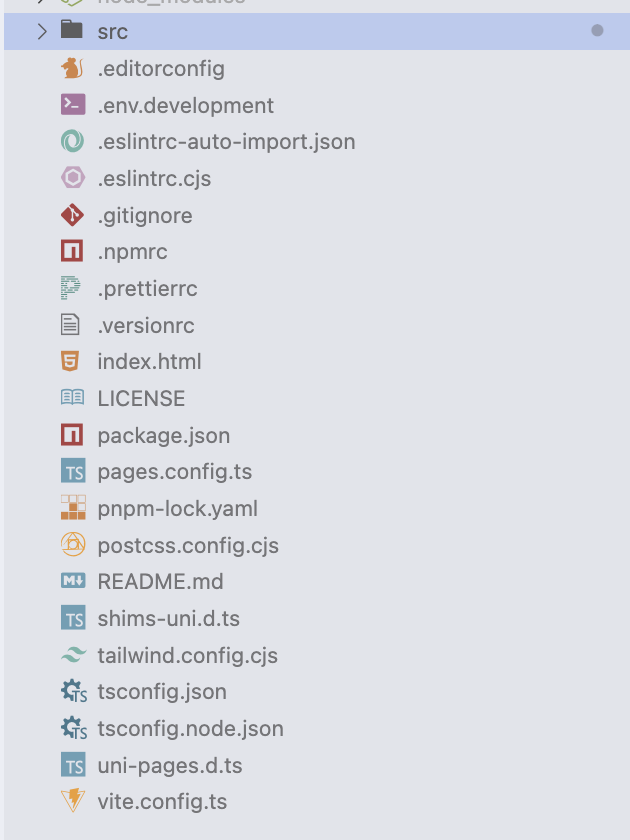
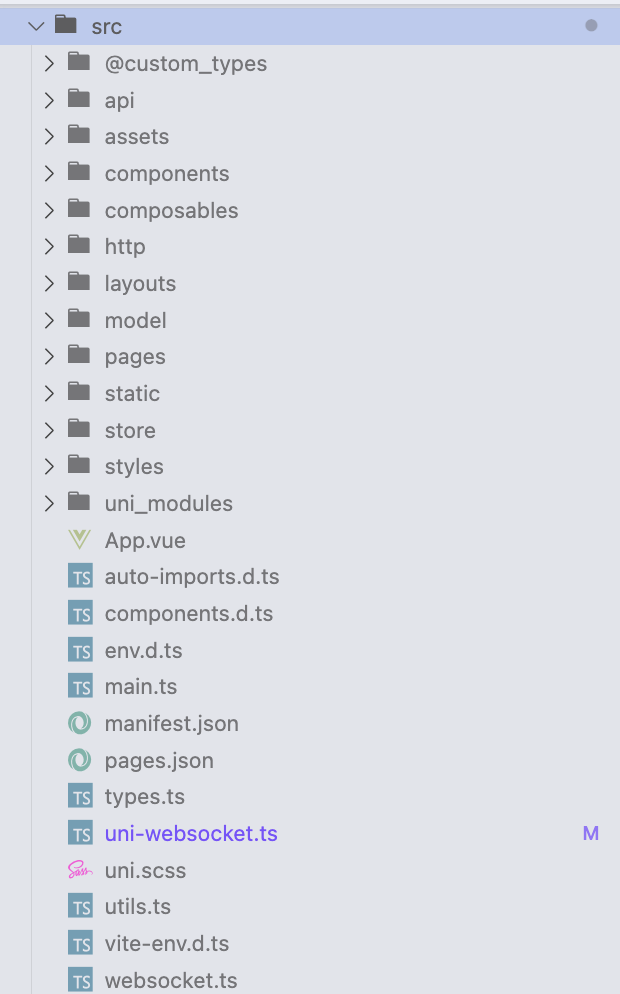
项目整体结构


问题

开发环境问题

  • pinia 运行出错 xxxxx pinia export named 'hasInjectionContext'

    请使用固定版本2.0.x的 pinia版本 , 不要使用 ^2.0.x开头, 目前 uniapp官方人员排查问题未知, 但web端环境则不会

  • vs-code import xxx 依赖编译出错

    使用 command + shift + p 打开配置使用设置, 输入typescript, 选择第二项,使用工作空间的typescript版本, 如果没有提示volar 工具, 则需要下载 TypeScript Vue plugin(Volar) 插件或者全家桶Vue Volar extension Pack

配置问题

  • 启动出现 # [plugin:vite:vue] At least one <template> or <script> is required in a single file component.

    vite.config.js中 去掉vue(), 这个是编译vuejs使用的

开发问题

编译错误

  • 提示globalThis 错误, 检查引入的组件是否有不兼容的写法, 使用排除法进行排查
  • svg不支持在ios平台, 可将svg替换成font字体图标
  • window对象不支持
  • uniapp不支持部分Vue3的Transition过渡动画, 会出现类似错误 TypeError: undefined is not an object (evaluating 'i.classList.add') __ERROR

编码

  • 注意组件加载和接口调用顺序, 如onShow、onLoad 、onMounted等, 优先级高的接口要优先调用, 例如获取用户接口, 判断token有效接口等

真机调试

样式不兼容
  • tailwindcss 不生效, 分辨率单位适配问题
1
2
3
4
5
6
7
8
9
10
11
12
13
14
15
16
17
18
19
20
// vite.config.js
import alias from "@rollup/plugin-alias"
import uni from '@dcloudio/vite-plugin-uni'
import tailwindcss from 'tailwindcss'
import uniTailwind from '@uni-helper/vite-plugin-uni-tailwind' // 适配小程序和app

export default defineConfig({
css: {
postcss: {
plugins: [
tailwindcss(),
],
},
},
plugins: [
alias(),
uni(),
uniTailwind()
]
})
  • page页面无高度问题
1
2
3
4
5
6
7
8
9
10
11
/**在App.vue 添加全局样式**/
uni-page-head {
display: none;
}
uni-page, uni-page-body {
height: 100%
}
::-webkit-scrollbar {
width: 0;
height: 0;
}
  • 使用原生html标签导致 uni-button和tailwindcss样式冲突
1
2
3
4
5
6
7
8
9
10
/**
* 针对重名html标签, 首先自定义类样式, 然后在需要重载的button组件页面添加该样式, 注意需要使用scoped 作用域
*/
<style scoped>
button {
padding: 0 !important;
background-color: transparent !important;
border: none !important;
}
</style>
组件不兼容
  • 同级兄弟组件传递 可以使用 uni.$onuni.$emit进行传递事件数据, 在 onMounted挂载事件, 在onUnMounted函数中使用 uni.$off卸载事件, 否则会多次执行
  • textarea内置组件在IOS真机下, 绑定了value值之后在原生虚拟键盘下, 快速打字会导致输入框失焦, 具体操作是: 输入法的候选词和键盘同时按下有90%概率触发, 可能是组件与IOS不兼容的bug, input组件无此问题
其他
  • 去掉uniapp 顶部样式和键盘工具条样式、无回弹效果 设置pages.json中的app-plus属性
1
2
3
4
5
6
7
8
9
10
11
12
13
{
path: 'pages/index',
type: 'home',
style: {
navigationBarBackgroundColor: '#F8F8F8',
navigationStyle: 'custom', // 使用自定义导航栏,系统会关闭默认的原生导航栏
'app-plus': {
'bounce': 'none',
'softinputMode': 'adjustResize', // 自适应软键盘弹起页面高度
'softinputNavBar': "none"
}
}
}
  • 首屏页展示: 在pages中设置第一个页面的配置信息, 即首屏展示第一个页面
  • 在设置图标中, 并不一定需要在button中设置插槽放入图标, 可以直接将图标放入div中, 设置margin: 10px即可
  • scroll-view的使用: 内容滚动到底部, 在dom加载后计算内容div容器的高度, 该场景适合内容是动态添加的模式
1
2
3
4
5
6
7
8
9
10
11
12
13
14
15
<script setup lang="ts">
import { ref } from 'vue'
const scrollHeight = ref(0)
const scrollTop = ref(0)

// 滚动到底部
const sorollButtom = () => {
let contnetContaniner = uni.createSelectorQuery().select('.message-content') //根据组件id获取
contnetContaniner
.boundingClientRect((data: any | null) => {
scrollTop.value = data.height
})
.exec()
}
</script>
  • websocket.send方法回调函数不兼容问题(h5, ios) , 在ios平台下, 如果后端服务宕机, 从uni.connectWebsocket创建的实例中使用send发送消息失败无法返回errCode编码且发送成功和失败回调函数都会执行, 先执行的fail后执行的success, 可以尝试如下解决方案,定义变量接失败函数的返回值, 再将处理后的结果返回到调用端
1
2
3
4
5
6
7
8
9
10
11
12
13
14
15
16
17
18
const sendMessage = (wsKey: String, data: string, onComplete: WebSocketMegFunc) => {
const ws = wsMap.get(wsKey)
console.log('get websocket instance', ws)
// 设置结果标识
let sendFlag = true
if (ws) {
ws.socket.send({
data,
fail(arg: any) {
console.error('消息发送失败')
sendFlag = false
}
})
if (onComplete) {
onComplete({success: sendFlag})
}
}
}
  • websocket 在ios app中服务端关闭连接在创建时 不会触发onClose事件 但是会触发onError事件, 可在onError 事件中进行重试
  • 真机App冷关闭(完全退出)后, App.vue 的onHide 函数中只会执行首行的代码逻辑, 具体原因未知, 热关闭(后台)不会出现该问题
  • 设置启动图固定延迟时间
1
2
3
4
5
6
7
8
9
10
11
12
13
14
15
16
17
18
19
20
21
// mainfast.json中
/* 5+App特有相关 */
"app-plus" : {
"usingComponents" : true,
"nvueStyleCompiler" : "uni-app",
"compilerVersion" : 3,
"splashscreen" : {
"alwaysShowBeforeRender" : false,
"waiting" : true,
"autoclose" : false,
"delay" : 0
}
}

// onLaunch 中实现
// #ifdef APP-PLUS
// 设置2秒后主动关闭,最多设置6秒
setTimeout(() => {
plus.navigator.closeSplashscreen();
}, 2000);
// #endif
  • 清除app角标
1
2
3
4
// onShow中使用 h5+的api设置
// #ifdef APP-PLUS
plus.runtime.setBadgeNumber(0);
// #endif
  • 监听网络状态
1
2
3
4
5
// onLanuch 中监听事件
uni.onNetworkStatusChange(function (res) {
console.log(res.isConnected); // true是已连接, false网络已关闭
console.log(res.networkType); // 网络类型是wifi还是3/4/5G
});
  • app端使用推送功能需要获取推送id: 需使用uniPush 2.0需要使用 uni.getPushClientId()方法
  • 在App端选中复制文本内容, 使用css样式 user-select:auto
  • 国际化实现
1
2
3
4
5
6
7
8
9
10
11
12
13
14
15
16
17
18
19
20
21
22
23
24
25
26
27
28
29
30
31
32
33
34
35
36
37
38
39
40
41
42
43
44
45
46
47
48
49
50
51
52
53
54
55
56
57
// 初始化, 所在目录 @src/locale.ts, 同目录有国际化资源文件 en.json、zh-Hans.json等
import { createI18n } from 'vue-i18n'
import en from './en.json'
import zhHans from './zh-Hans.json'
import zhHant from './zh-Hant.json'

// 设置国际化
if (!uni.getStorageSync('moy-locale') && uni.getLocale()) {
uni.setStorageSync('moy-locale', uni.getLocale())
}

const i18n = createI18n({
// 使用 Composition API 模式,则需要将其设置为false
legacy: false,
globalInjection: true,
locale: uni.getStorageSync('moy-locale'),
messages: {
en: {
...en
},
'zh-Hans': {
...zhHans,
// 占位符的方式只能用函数式解决
'contact.lastSeen': ({list}: any) => `上次活跃 ${list(0)} `
},
'zh-Hant': {
...zhHant
}
}
})

export default i18n

// main.ts
// ....省略其他代码
import { createSSRApp } from 'vue'
// 国际化
import i18n from './locale'
// ....省略其他代码

app.use(i18n)
return {
app,
Pinia
}

// composition API中使用
import { useI18n } from 'vue-i18n'
const { t } = useI18n()
// ......省略其他代码


// template中使用
// ......省略其他代码
<template>
<div> {{ $t('global.message') }} </div>
</template>

HBuilder 打包和发布

  • 开通unipush2.0 推送服务, 申请推送证书, 需要导出证书的.p12文件
  • 推送服务使用的unipush2.0 , 在HbuilderX中创建云环境, 再创建云函数, 命名云函数名称, 然后点击新创建的云函数名称, 选择管理扩展库, 选择扩展库的插件uni-clould-push , 最后编写代码逻辑上传部署函数
  • 设置启动页-必须要有自定义基座,打包后生效
  • 设置图标 (打包后生效)
    • 图标必须是直角,不要使用圆角图标,使用圆角appstore审核不会通过
    • 打包提交appstore时,必须配置1024*1024分辨率的appstore图标,云端打包机默认使用纯白色图标
    • 发行(生产) 正式包使用发布证书制作的自定义基座是不允许运行到模拟器和真机的

上架AppStore和审核

审核过程

账号被调查
1
2
3
4
5
6
7
8
9
10
11
12
13
Hello,  

Thank you for submitting your app for review.

We need additional time to evaluate your submission and Apple Developer Program account. Your submission status will appear as "Rejected" in App Store Connect while we investigate. However, we do not require a revised binary or additional information from you at this time.

While there may be a delay due to high submission volumes, we are working to complete our review as soon as possible. If we notice any issues that require your attention, we will let you know via App Store Connect. If we find no issues with your submission or account, the submission will be approved.

We will notify you as soon as there is new information to share. Other review inquiries may be filed via the [Apple Developer Contact Us](https://developer.apple.com/contact/topic/SC1103/subtopic/30020/solution/select) page.

Best regards,

App Review
Guideline 2.1 - Information Needed
Guideline 1.2 - Safety - User-Generated Content
Guideline 1.5 - Safety
Guideline 5.1.1(v) - Data Collection and Storage
Guideline 2.1 - Performance